I read your CRM setup and send back a written list of what to fix.
For SEC-registered advisory firms with 2 to 10 people. I know Redtail best: I spent three years on its Tier 2 support team, under SEC and FINRA rules. $299 flat, in writing within a week, from an export with no client names in it or from a login you create. Your pick.
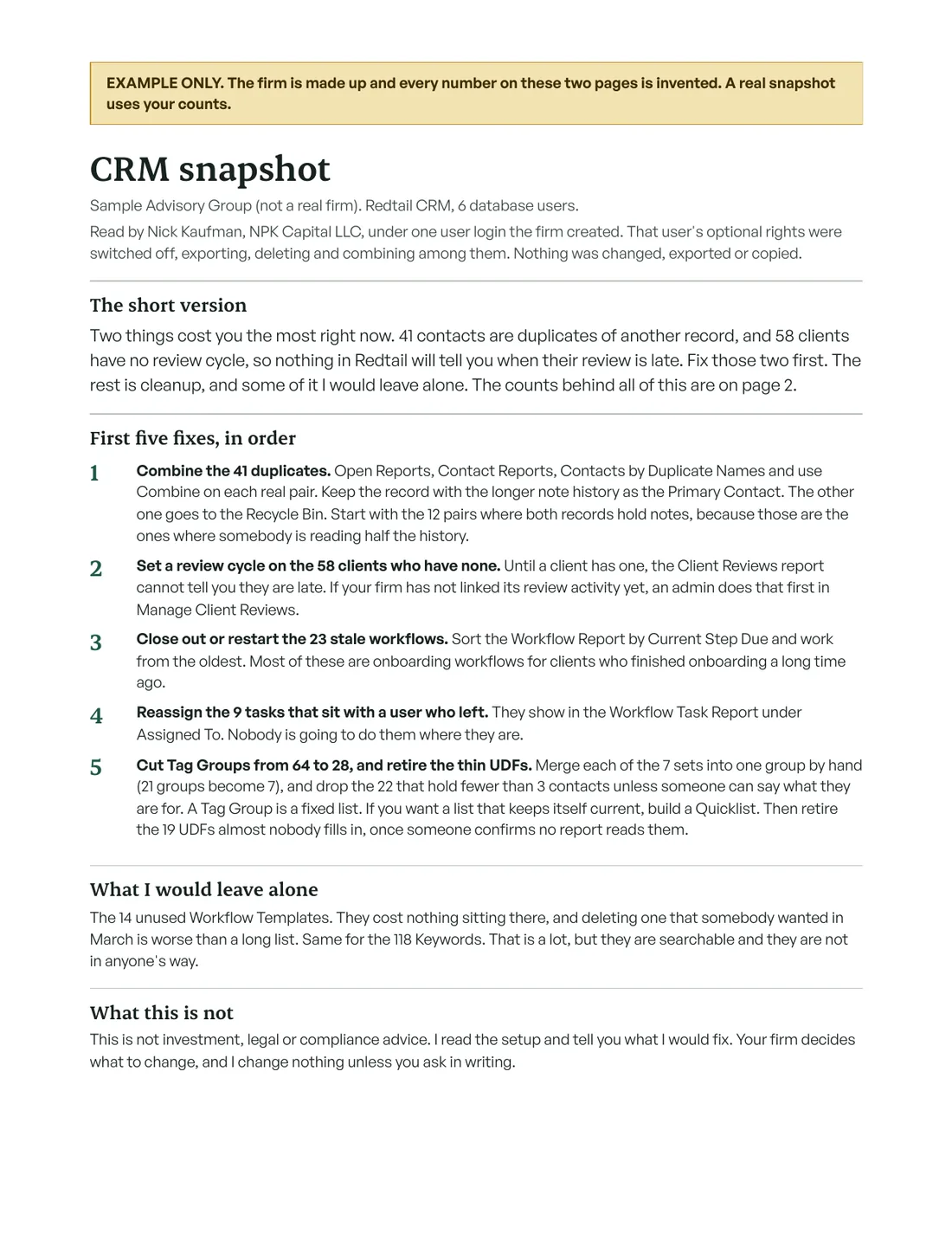
I answer by email, and there are no calls. The free check reads your own contact export inside your browser and shows your counts. Nothing uploads. Or read the sample snapshot (PDF, 2 pages).
- Three years on Redtail's Tier 2 support team
- $299 flat, paid after it arrives
- In writing within 7 days, no calls
What usually turns up
My guess is your CRM got set up once and nobody has owned it since. That is normal at a firm your size. It leaves the same messes behind, and these four are the ones I count first.
- Duplicate contacts
- Two records for one client, each holding half the notes. Redtail's duplicate report matches on first and last name only, so a person has to read every pair before anything gets combined.
- Workflows nobody runs
- Onboarding workflows still open on clients who finished onboarding long ago, and tasks assigned to someone who left the firm.
- Tags and fields to cut
- A tag list that has turned into a junk drawer, plus user defined fields that are filled in on a handful of contacts.
- Clients with no review cycle
- If a client has no review cycle set, nothing in the CRM tells you when their annual review is late. Then it comes down to someone's memory.
What you get back
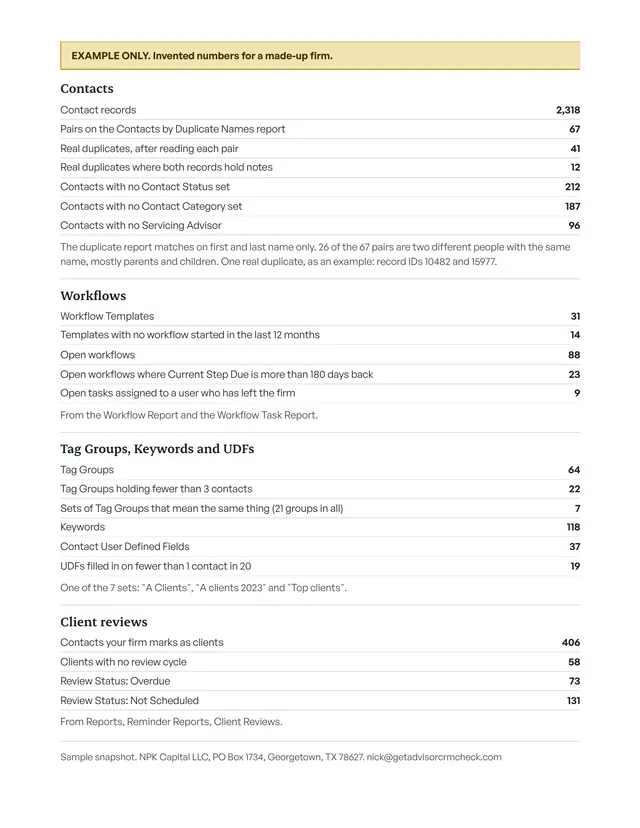
A few pages, in writing. The fixes come first, in the order I would do them. The counts behind them come second, so whoever does the cleanup can check my work.
It also says what I would leave alone. Deleting a workflow template that somebody wanted in March is worse than keeping a long list.
The snapshot names counts and settings. It never names a client. If an example helps, it points to a record ID.
How it goes
You pick how I read it: from an export with no names in it, or from a login you create.
- 1
You email me and pick a road.
-
2
Road one
No loginIn Redtail, build a custom export template with status, category, source, keywords, your user defined fields and the Know Your Client review fields, and leave names, emails, phones and addresses out. Email me that CSV. Nothing in it names a client, so most firms treat it as setup data, not client data. Your compliance officer makes that call, not me. Duplicates are the one thing I cannot read from it, and Redtail's own duplicate report covers names.
2Road two
A loginI send my written answers to your vendor due diligence questions and a one page agreement first. You create one user for me with the narrowest rights your CRM allows (Redtail lets you switch off exporting and deleting for that user, and I ask you to switch off all of it). I read the setup, change nothing, and do not export, download, copy, print or screenshot client records. When the snapshot arrives you turn the login off.
- 3
Either road, the snapshot arrives by email within 7 days: the fixes in order, the counts behind them, what to leave alone.
- 4
You pay $299 by card link, after you have the snapshot.
Paper for your vendor file (the login road)
The SEC's amended Regulation S-P requires SEC-registered advisers to oversee service providers that have access to customer information. For smaller firms the compliance date was June 3, 2026 (SEC small entity compliance guide, PDF).
I am that kind of vendor the minute I log in. So you get my questionnaire answers and a signed agreement first, and the agreement commits me to tell you within 72 hours of learning that anyone got at your customer information through my login or my devices.
The short version for your file
- Who does the work
- Nick Kaufman does all of it. There are no subcontractors.
- What I touch
- One user login that you create in your own CRM. I never touch your custodian, portfolio, email or file systems.
- What I keep
- The snapshot, my invoice, the signed agreement and our emails. I keep no client data.
- Where I work
- One computer that only I use. Full disk encryption is on and the screen locks after 5 minutes.
- When the work ends
- You turn the login off.
Who you are dealing with
I'm Nick Kaufman. I've done software support for about six years, including three under SEC and FINRA rules, on the Tier 2 support team at Redtail.
I am taking my first few clients for this work, so there are no testimonials here yet and I am the one who answers your email. The business is NPK Capital LLC, a Texas LLC. It is not an investment adviser.
What it costs
$299 flat
One price for the snapshot, paid after it arrives. If you want the fixes done for you afterward, ask and I will quote that in writing before any work starts.
This is not investment, legal or compliance advice. Your firm stays responsible for its own compliance program.
Questions you probably have
Can I see something before I create a login for you?
Yes. Export your contacts as a CSV and drop the file on the free check page. It counts duplicates, clients with no review date, junk tags and empty fields inside your own browser. The page is forbidden by its security header from sending anything to any server, so the file stays with you. Email me the counts and I will tell you what I would fix first, whether or not you buy the read.
Do you see our client data?
Not on the export road: the file you send has no names, emails or phones in it. On the login road I see what your CRM shows the user you create, because there is no other way to read the setup. No client records leave the CRM. I do not export or screenshot them, and that is in the agreement you sign.
One caveat you should hear from me first. A normal CRM user can still add and edit records, so "I change nothing" is a promise in the agreement. The software does not enforce it.
Do we have to get on a call?
No. The questionnaire, the agreement and the snapshot are all in writing, and so are my answers to anything you ask along the way.
We do not use Redtail. Can you still do it?
Maybe. Redtail is the one I know from the inside. If you run Wealthbox or another CRM, tell me which one and I will say plainly whether I can read it well enough to be worth $299.
When do we pay, and what if it falls short?
You pay after it arrives. If you paid and it was not what the agreement describes, email me within 30 days and I refund the $299.
Worth a second set of eyes on yours?
Email me the name of your CRM and about how many people use it. I will send the questionnaire answers and the agreement, and you can decide from there.
Email me about your CRM